

LG Smart TVs and webOS: What the Investigation Means for Connected Device Security
A hands on investigation by Gamers Nexus and Level1Techs found that recent LG smart TVs scan the local network to map other devices, capture microphone audio while appearing to be off, and run webOS with remote code execution flaws that are now in responsible disclosure. For anyone with one of these televisions on a shared or corporate network, the device is an untrusted node worth isolating, monitoring, and keeping out of sensitive spaces.
This guide is written for security teams, IT leads, and anyone who has connected a smart television to a network that also carries work. It covers what the investigation actually found, why the security part matters more than the privacy headline, what a smart TV exposes on a corporate network, and what to do about it.
Table of Contents
What the Investigation Found
The work was led by Gamers Nexus, with Level1Techs and three independent security researchers, and ran to more than 500 hours and around 70,000 US dollars of testing on retail LG OLED televisions, including the 2025 G5 flagship. Using Wireshark packet captures, the team recorded what the sets actually did on the network.
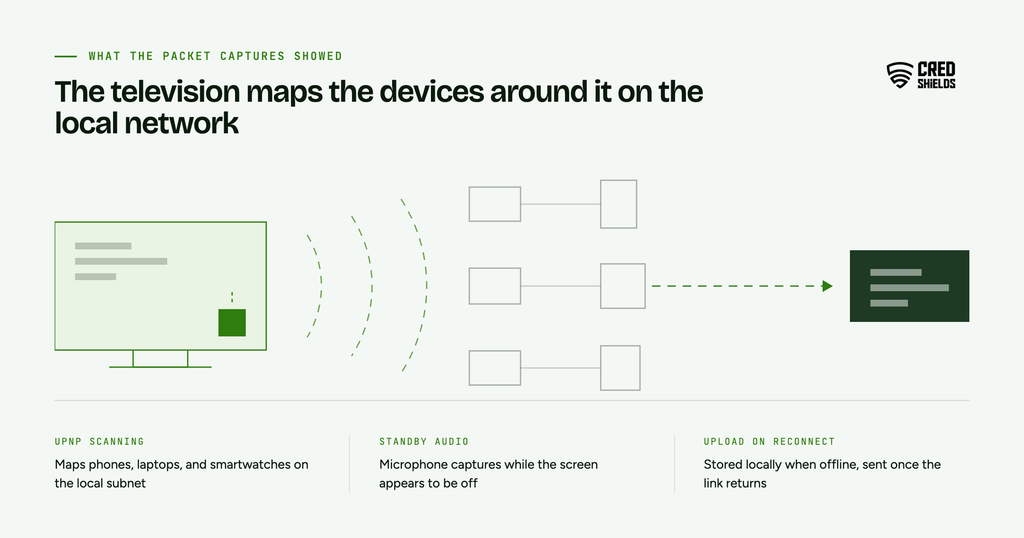
Three findings stand out on the LG smart TVs. First, webOS repeatedly scanned the local network, using UPnP, to map devices that have nothing to do with playing video, including phones, laptops, and smartwatches, and it also collected the names, signal strengths, and locations of nearby Wi-Fi networks. Second, the televisions captured microphone audio while the screen appeared to be off, stored it locally when disconnected, and uploaded it once reconnected, with voice prompts logged in plaintext. Third, the team documented remote code execution vulnerabilities in webOS, which they reported to LG through a responsible disclosure process, with technical detail withheld while fixes are worked out.
Two caveats matter for how you read this. Behaviour varies by model, webOS version, and settings, so this is not a claim that every LG television behaves identically. And LG had not publicly answered the specific findings as of 8 September 2026, so this account rests on the investigation and the reporting around it.
What Makes This a Security Problem
Most coverage frames this as a privacy problem, and the intentional data collection is real. There is a separate issue that a security team should care about. The network scanning is reconnaissance, the same mapping of nearby hosts an attacker performs early in an intrusion, and it runs alongside a microphone that records in standby and a webOS remote code execution flaw that lets an outside party run code on the device.
Together these turn the television into an exposed, network-aware computer sitting inside your perimeter, one you did not harden and cannot patch on your own schedule. Anyone who finds the same paths the researchers did inherits that access, whatever LG intends by the design.
What a Smart TV Exposes on a Corporate Network
Offices are full of smart televisions. They sit in boardrooms, reception areas, huddle rooms, and executive offices, often on the same network as laptops and shared drives, and often connected once and forgotten. The investigation’s findings map directly onto risks that matter in that setting.
The network scanning is the clearest example. A television that stores phones, laptops, and other hardware on the local subnet is building exactly the map an intruder wants, and it is doing so from inside a space where sensitive conversations happen. The standby audio capture puts a working microphone in that same room, and the webOS remote code execution flaws leave a reachable set as a possible entry point until they are fixed. That is a lot of capability to leave unmanaged on a working network, whoever ends up using it.
| Recommended read: Our piece on why agentic systems are now a security boundary makes the same argument in a different domain, that a capability you added without threat modelling becomes a boundary an attacker will test. |
What the packet captures showed
There is a lesson here that sits at the centre of how we work. LG’s stated privacy position is that its televisions “do not collect, record, or store ambient conversations,” and the investigation’s packet captures point the other way. That gap only closed when someone captured the traffic and watched what the device actually did.
That is the difference between assumed behaviour and verified behaviour, and it is the reason hands-on testing exists. A privacy notice or an automated scan describes what a system is supposed to do. Reproducing the behaviour on the wire shows what it does. For any device or vendor you bring inside your perimeter, the trustworthy answer comes from testing it yourself.
| Recommended read: Manual versus automated penetration testing explains where reproducing behaviour by hand surfaces what a scanner or a spec sheet will not. |
What To Do About It
The controls split by setting. Treat this as a starting point; a full risk assessment against your own environment still applies.
For a home or a single device, the investigators’ own recommendation was to disconnect the television from the internet by unplugging Ethernet and telling it to forget your Wi-Fi and to use a separate streaming device instead. If you manage your own router, blocking the television’s outbound connections with firewall rules helps, and it scales to several sets at once.
For an organisation, the work is about containment and inventory:
Hardening checklist
A smart television security checklist
Use this checklist as a fast self-assessment for the smart televisions and connected displays on your networks. Work through it before you treat one as trusted.
You have run the full checklist. Your displays are inventoried, isolated, and firewalled, with firmware treated as untrusted. The line most teams assume rather than prove is that the isolation actually holds.
If item 06 is the gap, a human-led engagement can test what each device can actually reach, proving the segment holds rather than assuming it, with every finding reproduced and signed by the researcher who found it.
Scope a segmentation testFrequently Asked Questions (FAQs) About Security Around LG Smart TVs
The investigation tested retail LG OLED models, including the 2025 G5. Behaviour varies by model, webOS version, and settings, so this is not a confirmed claim that every LG television behaves the same way.
Both. LG’s data collection is intentional and is the privacy story. Separately, the team documented remote code execution vulnerabilities in webOS, which is the security story, since those could let an outside party run code on the device.
Not at the time of writing. The remote code execution flaws were reported to LG through responsible disclosure, with technical detail withheld while fixes are worked out, and no CVEs had been published.
The investigators recommended disconnecting the television from the internet and using a separate streaming device. For organizations, isolating the device on its own segment and blocking outbound traffic is the more practical control.
Because a network-aware device that maps other hardware, captures audio, and carries a remote code execution flaw is an exposed computer inside your perimeter. It belongs in your asset inventory and your threat model.
The LG findings are a specific case of a general problem: every connected device you add is a computer you did not harden and cannot fully control, and the only reliable way to know what it does on your network is to watch it do it. Inventory the connected displays you already have, isolate them, and confirm the isolation holds by testing it.
CredShields runs that kind of hands on review, scoped per engagement, and reports findings that have been reproduced and verified.