
SolidityScan x Xone Explorer: Seamless Security Integration
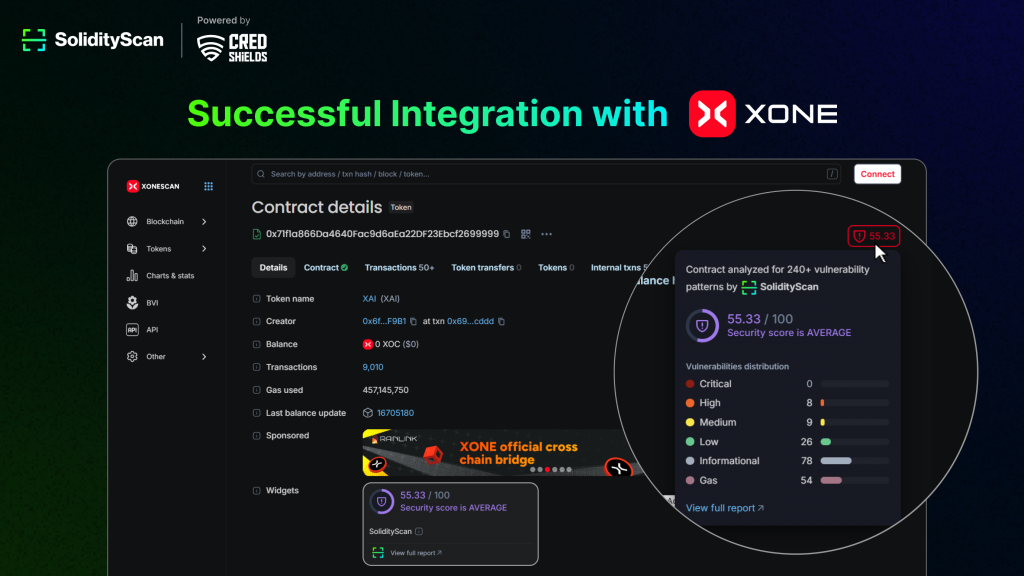
As Web3 grows rapidly, secure smart contract interactions are critical for maintaining trust and safeguarding user funds. Addressing this challenge, CredShields has integrated SolidityScan with Xone Explorer, bringing real-time smart contract threat analysis directly into the blockchain explorer interface.
With this integration, developers and users can instantly assess a contract’s security posture before interacting with it, thanks to AI-powered security analysis, threat scoring, and vulnerability breakdowns, all embedded into the Xone Explorer experience.
Table of Contents
About Xone Chain
Xone is an advanced EVM-compatible blockchain optimized for speed, scalability, and developer accessibility. With support for major Ethereum tooling and a dedicated explorer, Xonescan serves as a powerful ecosystem for launching and monitoring decentralized applications. However, without built-in contract security insights, users and developers were often left in the dark regarding code safety.
This integration bridges that gap, enabling security-first development and user trust from the explorer itself.
How to Use SolidityScan on Xone Explorer
1. Navigating to Verified Contracts
- Visit Xonescan
- Click the Blockchain section in the sidebar
- Select Verified Contracts from the dropdown
This section lists smart contracts deployed and partially or fully verified on the Xone mainnet.
2. Viewing the SolidityScan Security Score
- Click any contract from the Verified Contracts list
- On the contract’s details page, you’ll see a SolidityScan security card showing:
- Security Score (out of 100)
- Lines of Code
- Scan Duration
- Direct access to audit insights
This security badge empowers developers and users to make informed decisions by surfacing threats and vulnerabilities instantly.
3. Accessing the Full Audit Report
- Click the View full report link on the SolidityScan card
- You’ll be redirected to SolidityScan QuickScan
- There, you can view:
- Total vulnerabilities found
- Threat score & classification
- Breakdown into Critical, High, Medium, Low, Informational, and Gas issues
- Executive and threat summaries
If you already know the contract address, you can enter it directly on QuickScan by selecting Xone (Mainnet) from the blockchain dropdown.
4. Getting a Verified Report
After reviewing the AI-generated report, developers can unlock a verified audit PDF by:
- Clicking View Audit Report PDF
- Proceeding with payment to publish a verified, CredShields-reviewed audit
- This includes vulnerability classification, remediation guidance, and a summarized executive report
To dive deeper into the features, sign into the SolidityScan dashboard for historical scans, contract monitoring, and project-specific dashboards.
Benefits for Developers & Users on Xone
This integration marks a step forward in secure-by-default blockchain development:
- For Developers: Get instant feedback on code quality, catch vulnerabilities pre-deployment, and improve smart contract hygiene with every release.
- For Users & Investors: Validate a contract’s security before interacting, reducing risks of fraud, exploits, or misconfigurations.
- For the Ecosystem: A safer development environment strengthens the Xone network’s credibility, encouraging adoption and innovation with confidence.
Pioneering Blockchain Security for the Next Era
As on-chain activity scales, SolidityScan’s integration with Xone Explorer ensures security becomes a built-in feature, not an afterthought. With AI-driven risk detection, automated scoring, and easy-to-access reporting, users and developers alike benefit from a more transparent, informed, and secure Web3 experience.
Try SolidityScan on Xone Explorer today and build with confidence.