

Mobile App Security, A Complete Guide to iOS and Android Pentesting
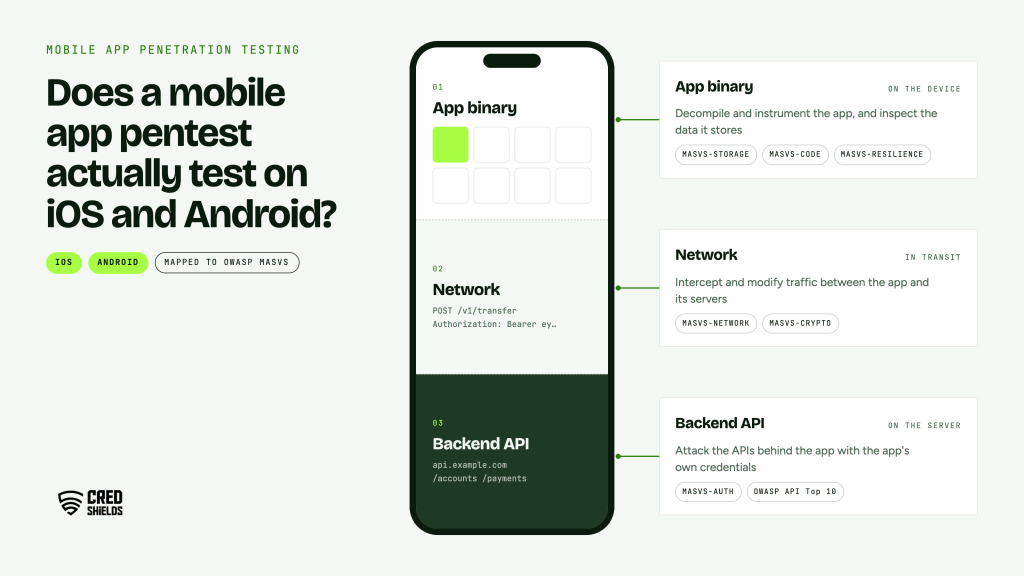
Does a mobile app pentest actually test on iOS and Android? Mobile app penetration testing is a manual security assessment of an iOS or Android app, the data it stores on the device, its communication with backend APIs, and the platform features it relies on. Testers decompile and instrument the app, intercept its traffic, and attack the APIs behind it, mapping each finding to the OWASP MASVS so it is reproducible and verified.
The OWASP mobile standards reached a milestone in 2026 with the first stable release of the restructured testing guide, and the apps they describe now carry payments, health records, and identity. This guide is for mobile engineering leads, AppSec teams, and product owners at fintech, healthtech, and e-commerce companies preparing for a test.
What Mobile App Penetration Testing Covers
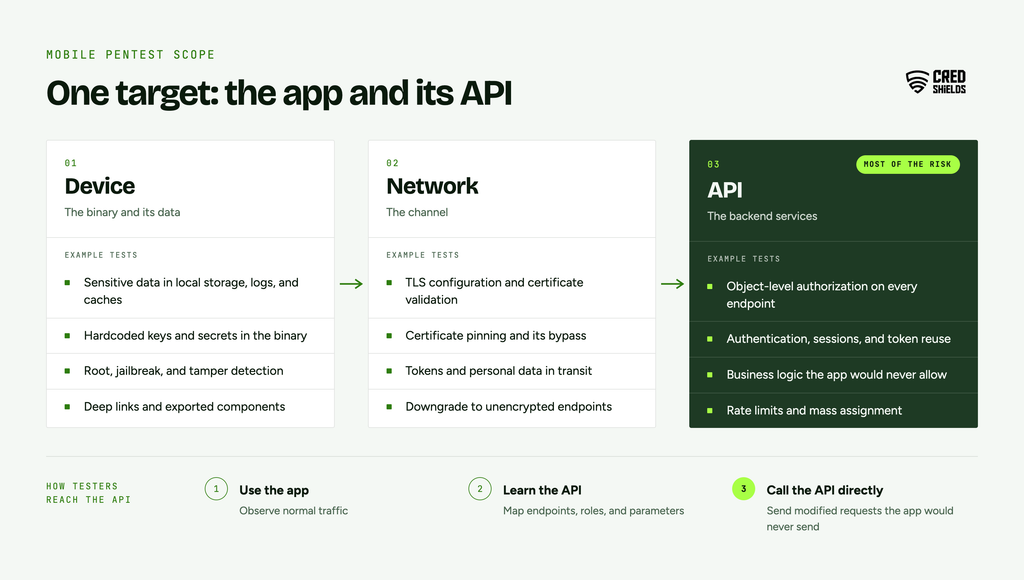
Mobile app penetration testing examines an app across three layers: the binary and its data on the device, the network channel, and the backend services the app calls. A test that stops at the device misses most of the risk, because the app is a client and the API decides what any user can see or do.
A complete engagement therefore treats the app and its API as one target. Testers use the app to learn the API’s behavior, then call the API directly with modified requests the app would never send.
The OWASP MASVS Categories: A Mobile Pentest Maps To
The OWASP Mobile Application Security Verification Standard defines what a secure app should do, and the Mobile Application Security Testing Guide describes how to verify it, now linked to the Mobile Security Weakness Enumeration. The MASTG v2.0.0 release, covering January to June 2026, completed a multi-year refactor into individually referenceable tests and was the first stable release of the new framework. Findings in a professional report map to these categories:
| MASVS category | What it checks | Example finding |
| MASVS-STORAGE | Sensitive data stored on the device | Session tokens in plain-text preferences or backups |
| MASVS-CRYPTO | Correct use of cryptography | Hardcoded encryption keys in the binary |
| MASVS-AUTH | Authentication and session handling | Biometric login that can be bypassed by hooking a function |
| MASVS-NETWORK | Secure communication | Certificate validation disabled in a release build |
| MASVS-PLATFORM | Safe use of platform features and IPC | Exported Android component or iOS URL scheme that triggers sensitive actions |
| MASVS-CODE | Code quality and dependencies | Outdated third-party library with a known vulnerability |
| MASVS-RESILIENCE | Resistance to reverse engineering and tampering | Root or jailbreak detection bypassed in minutes |
| MASVS-PRIVACY | Data minimization and user privacy | Analytics SDK collecting more personal data than disclosed |
How iOS and Android Pentesting Differ
The methodology is shared, but each platform packages apps, stores secrets, and passes data between apps differently. The differences decide which tools and test cases a tester reaches for.
| Area | iOS | Android |
| App package | IPA, encrypted from the App Store | APK or AAB, easier to extract and decompile |
| Decompilation | Binary analysis with tools such as Ghidra or Hopper | Bytecode decompilation with tools such as jadx and apktool |
| Secure storage | Keychain and Data Protection classes | Android Keystore, with SharedPreferences a common weak point |
| Inter-app communication | URL schemes, universal links, app extensions | Intents, exported activities, services, and content providers |
| Test device | Jailbroken device for full instrumentation | Rooted device or emulator |
| WebViews | WKWebView and message handlers | WebView with JavaScript interfaces |
The Mobile App Pentest Process, Step by Step
A well-run mobile engagement follows a predictable sequence, and the first step decides how much the rest can achieve. These are the stages:
1. Scoping and build preparation. Agree on platforms, app versions, API environments, and user roles. Provide test accounts for every role and a build suitable for instrumentation.
2. Static analysis. Decompile the app and review it for hardcoded secrets, exposed endpoints, insecure configuration, and vulnerable libraries.
3. Dynamic analysis and instrumentation. Run the app on a rooted or jailbroken device and hook functions with a toolkit such as Frida to observe and alter behavior at runtime.
4. Traffic interception and API testing. Proxy the app’s traffic, then attack the API directly: authorization on every object, input handling, rate limits, and session management.
5. Business logic testing. Test the flows that move money, change identity, or expose records, such as transfers, KYC steps, password resets, and referral rewards.
6. Resilience testing. Where required, measure how quickly root or jailbreak detection, pinning, and anti-tampering controls can be bypassed.
7. Reporting and retest. Each finding is reproduced with exact steps, mapped to MASVS, and retested after the fix.
Where Serious Mobile Findings Usually Come From
Severe mobile findings cluster in a handful of places, and most of them sit behind the app rather than inside it. These are the classes worth prioritizing in scope:
Broken object authorization in the API. Changing an account, order, or record ID in a request returns another user’s data.
Secrets in the binary. API keys, cloud storage credentials, or third-party tokens shipped inside the app and recoverable by anyone who downloads it.
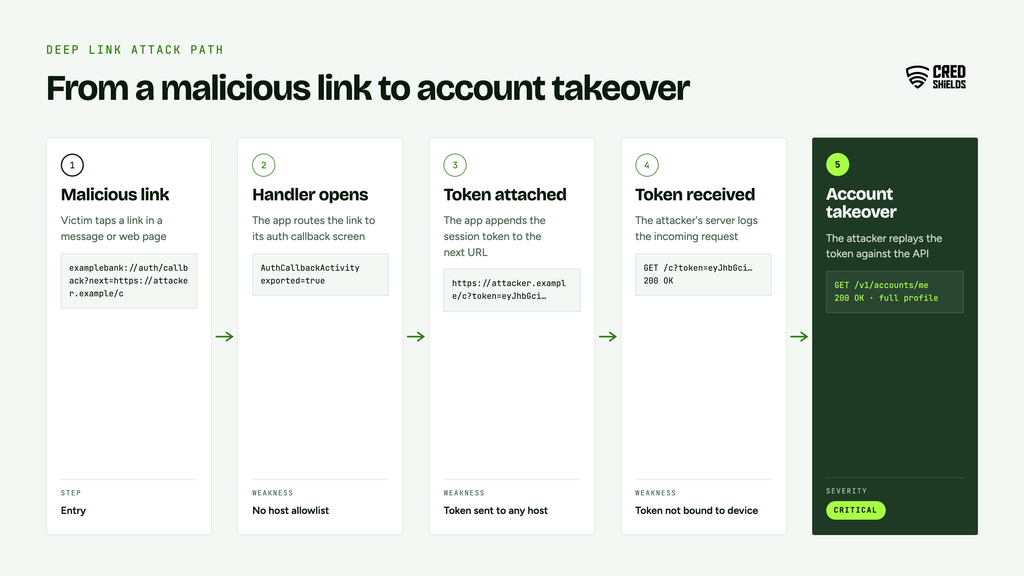
Deep link and IPC abuse. A crafted link or intent triggers a sensitive action or leaks a token to another app.
Local authentication that is not bound to cryptography. A biometric prompt whose result is a simple true or false can be hooked and bypassed on an instrumented device.
WebView bridges. JavaScript interfaces or message handlers that expose native functions to web content the app does not fully control.
Sensitive data in logs, caches, and backups. Tokens and personal data written where other apps, backups, or support tooling can reach them.
Mobile App Pentest Readiness Checklist
Prepare these items before the engagement starts so testing time goes to finding issues.
- Confirm platforms, app versions, and the API environment in scope
- Provide test accounts for every user role, with realistic data
- Supply a build that can run on an instrumented device, or agree on how pinning will be handled
- Share API documentation and a list of third-party SDKs
- Identify the flows that move money, change identity, or expose records
- Name a technical contact who can reset accounts and review logs during testing
- Book a retest window for after remediation
Frequently asked questions (FAQs) about mobile app penetration testing in Singapore
These answers cover what mobile and product teams ask most often before a first engagement.
Q1. What is mobile app penetration testing?
It is a manual security assessment of an iOS or Android app, its on-device data, its network traffic, and the backend APIs it calls, with findings mapped to the OWASP MASVS.
Q2. Does a mobile pentest include the backend API?
It should. Most serious mobile findings, such as broken object authorization, sit in the API the app calls. Include the API environment in scope.
Q3. How is iOS pentesting different from Android pentesting?
The methodology is shared, but packaging, secure storage, inter-app communication, and tooling differ. iOS testing typically needs a jailbroken device, while Android testing can use a rooted device or emulator.
Q4. What is OWASP MASVS?
The OWASP Mobile Application Security Verification Standard defines security requirements for mobile apps across categories such as storage, cryptography, authentication, network, platform, code, resilience, and privacy.
Q5. How often should a mobile app be pentested?
Before a major release, after significant changes to authentication or payment flows, and at least annually for apps that handle financial, health, or identity data.