

Cloud Pentesting Essentials, Securing AWS, Azure, and GCP Infrastructure
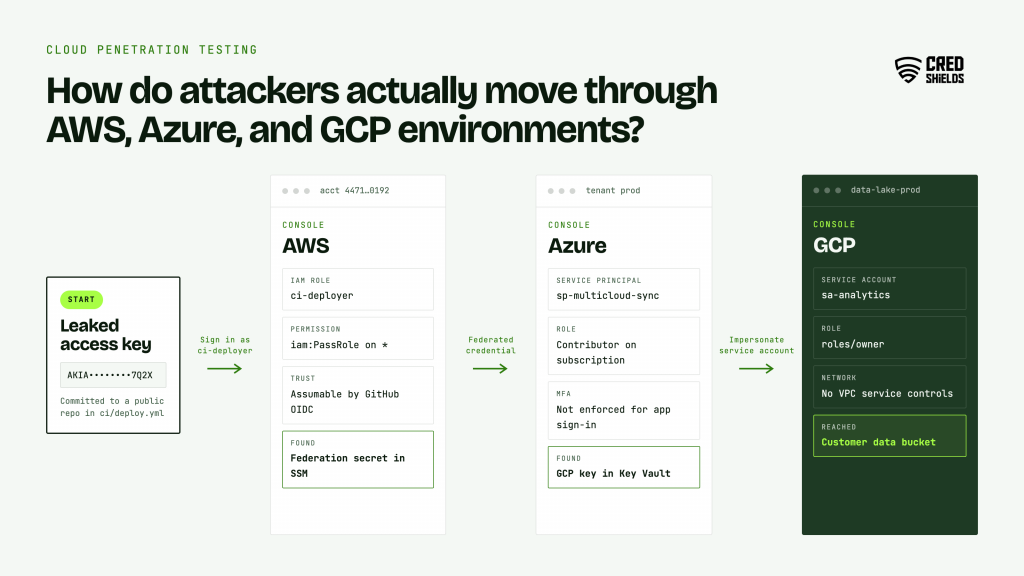
How do attackers actually move through AWS, Azure, and GCP environments? Cloud penetration testing is an authorized attack on an organization’s cloud accounts, workloads, and identities to find the paths an attacker could use to reach data or take control. On AWS, Azure, and GCP, the most damaging paths usually run through identity: leaked keys, over-permissioned roles, and trust relationships between accounts, services, and CI/CD pipelines.
The 2024 campaign against Snowflake customers showed how far stolen credentials reach when MFA and network restrictions are missing, and every major provider places those controls on the customer’s side of the shared responsibility line. This guide is for cloud platform engineers, DevOps leads, and security teams running workloads on one or more of the three major providers.
What Cloud Penetration Testing Covers
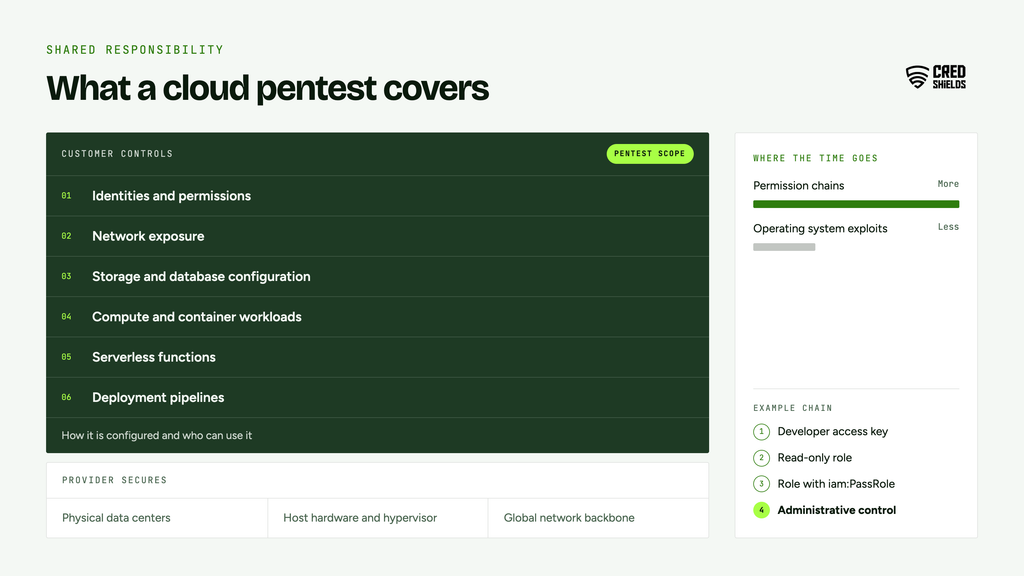
Cloud penetration testing covers the parts of a cloud environment the customer controls: identities and permissions, network exposure, storage and database configuration, compute and container workloads, serverless functions, and the pipelines that deploy them. The provider secures the underlying infrastructure, and the customer secures how it is configured and who can use it.
That split shapes the work. A cloud pentest spends less time on operating system exploits and more on permission chains, where one modest foothold, such as a developer’s access key, can be turned into administrative control through a series of individually legitimate actions.
What AWS, Azure, and GCP Allow You to Test
None of the three major providers requires prior approval for testing your own resources within their rules, but each sets limits that belong in the rules of engagement. The table summarizes them.
| Provider | Prior approval | Notable limits |
| AWS | Not required for services listed under Permitted Services, according to the AWS penetration testing policy | Testing that includes command and control requires prior approval; AWS infrastructure and services themselves may not be tested |
| Microsoft Azure | Not required since June 2017, per 7ASecurity’s summary | Tests must follow Microsoft’s Cloud Unified Penetration Testing Rules of Engagement; denial of service testing is prohibited |
| Google Cloud | Customers are not required to contact Google, as NCC Group’s authorization guidance notes | Testing is limited to your own resources and must follow Google’s acceptable use terms |
Whichever provider you use, give any third-party tester written authorization that lists the accounts, subscriptions, or projects in scope. Provider abuse detection can flag an authorized test, and that document resolves it quickly.
Why Identity Is the Real Cloud Perimeter
In June 2024, Mandiant reported that a threat actor it tracks as UNC5537 had accessed data from about 165 organizations through their Snowflake accounts. Mandiant found no evidence of a breach of Snowflake’s own enterprise environment; every incident it responded to traced back to compromised customer credentials.
SecurityWeek’s summary of the report lists the conditions that made it work: accounts without MFA, long-exposed credentials that had never been rotated, and no network allow lists. Mandiant said about 80% of the accounts had prior credential exposure, with some credentials stolen by infostealers on contractor systems.
The same pattern applies inside AWS, Azure, and GCP. Access keys in a public repository, a service account key on a contractor’s laptop, or a CI/CD role trusted by too many pipelines each give an attacker a legitimate identity to start from. A cloud pentest should begin from that assumption and measure how far such an identity can reach.
Common Cloud Attack Paths a Pentest Should Cover
The services differ by provider, but the attack paths rhyme. The table maps the paths that most often lead from a foothold to sensitive data or administrative control.
| Attack path | AWS | Azure | GCP |
| Server-side request forgery to instance credentials | Instance metadata service, where IMDSv1 needs no session token | Instance Metadata Service, which requires a Metadata header | Metadata server, which requires a Metadata-Flavor header |
| Privilege escalation through permissions | Roles that can pass other roles or edit their own policies | Role assignments such as Owner or User Access Administrator granted broadly | Permissions to impersonate or mint tokens for service accounts |
| Public or over-shared storage | S3 bucket policies and access points | Blob containers with anonymous access | Cloud Storage buckets granted to allUsers |
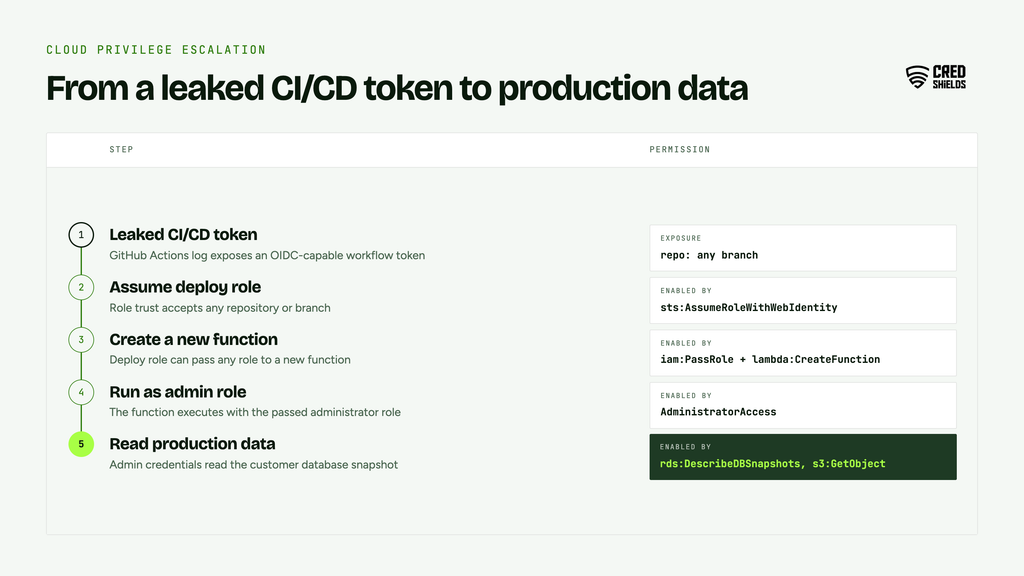
| Over-trusted CI/CD identity | OIDC role trust that accepts any repository or branch | Federated credentials scoped too broadly | Workload identity federation with loose attribute conditions |
| Cross-account or cross-tenant trust | Role trust policies with broad principals | Multi-tenant app registrations and guest access | Service accounts granted roles across projects |
| Secrets in configuration | Environment variables in Lambda or ECS task definitions | App settings in Functions or App Service | Environment variables in Cloud Run or Functions |
| Kubernetes workload identity | EKS pod roles with wide permissions | AKS workload identity mapped to privileged roles | GKE workload identity bound to privileged service accounts |
How a Cloud Pentest Is Scoped and Run
Cloud engagements work best when they combine an outside view with an assumed-breach view, because most real incidents start with a credential. A typical engagement runs in this order:
1. Define scope. List the accounts, subscriptions, or projects, the regions, and any shared or production resources that need extra care.
2. External assessment. Enumerate internet-facing endpoints, storage, and APIs as an outside attacker would.
3. Configuration review. Using a read-only audit role, review identity policies, network rules, logging, and encryption across the environment.
4. Assumed-breach testing. Start from a realistic foothold, such as a developer credential or a compromised workload, and attempt privilege escalation and lateral movement.
5. Attack path validation. Confirm which theoretical paths are exploitable, within the provider’s rules and the agreed limits.
6. Reporting and retest. Document each path with the exact permissions and requests used, then retest after remediation.
Cloud Pentest Readiness Checklist
Use this list to prepare for a cloud engagement or to check the basics before one.
- Inventory every account, subscription, and project, including forgotten sandboxes
- Enforce MFA for all human identities and remove long-lived access keys where possible
- Rotate credentials that have appeared in repositories, tickets, or infostealer logs
- Require IMDSv2 on AWS instances and restrict metadata access from containers
- Review CI/CD trust policies so only named repositories and branches can assume deployment roles
- Block public access on storage by default, with documented exceptions
- Centralize audit logs in an account attackers cannot modify
- Prepare written authorization naming the accounts and environments in scope
Frequently asked questions (FAQs) about cloud penetration testing in Singapore
These answers cover what cloud and security teams ask most often when planning a first engagement.
Q1. What is cloud penetration testing?
It is an authorized attack on the customer-controlled parts of a cloud environment, such as identities, permissions, network exposure, storage, and workloads, to find paths to sensitive data or administrative control.
Q2. Do I need permission from AWS, Azure, or Google to run a pentest?
No prior approval is needed for testing your own resources within each provider’s rules. AWS requires prior approval for testing that includes command and control, and Azure testing must follow Microsoft’s Rules of Engagement.
Q3. What is the most common cloud security weakness?
Identity. Missing MFA, unrotated credentials, and over-permissioned roles give attackers a legitimate starting point, as the 2024 Snowflake customer campaign showed.
Q4. What is an assumed-breach cloud pentest?
A test that starts from a realistic foothold, such as a leaked developer key, and measures how far an attacker could escalate privileges and move across accounts or services.
Q5. How often should cloud environments be pentested?
At least annually, and after major architecture changes such as new accounts, a new CI/CD platform, or a migration between providers.