

Shai Hulud npm Supply Chain Attack: How To Check If The keyv Compromise Reached You
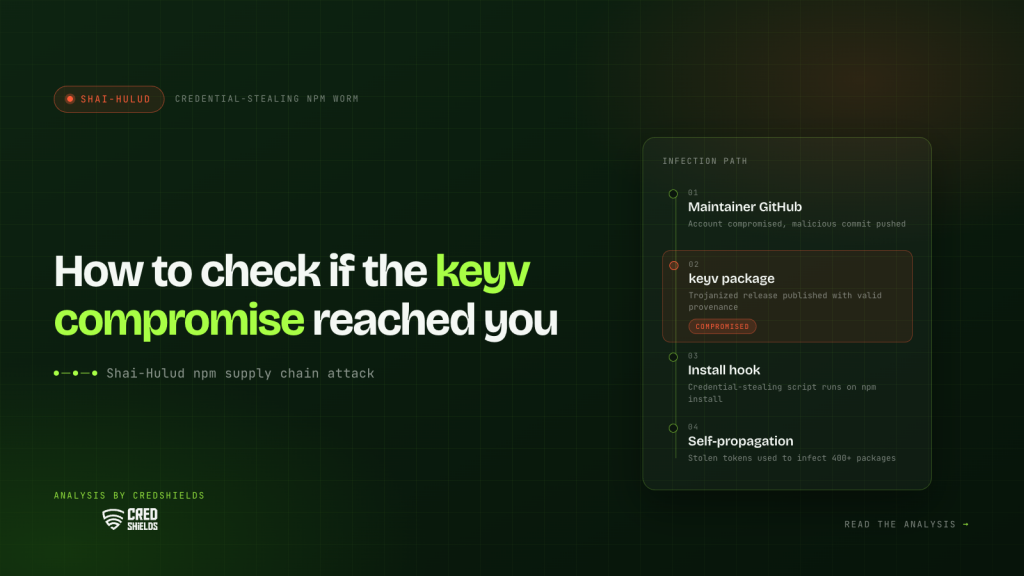
On August 4, 2026, a poisoned release of the npm package keyv spread the Shai Hulud credential-stealing worm to hundreds of packages. Check your lockfiles for keyv, cacheable, flat-cache, and file-entry-cache, confirm whether a compromised version actually installed, and if one did, rotate every reachable credential and rebuild affected machines before investigating further. Current version lists live in the GitHub Advisory Database.
The attacker’s way in was the GitHub account of the maintainer behind keyv, an npm key-value storage library downloaded roughly 127 million times a week. On August 4 they published a poisoned release carrying a credential-stealing worm. The same maintainer publishes cacheable, flat-cache, and file-entry-cache, and the compromise swept the family. From there the worm spread on its own, with trackers counting hundreds of further poisoned packages by the end of the day. Security teams across the industry, including Datadog Security Labs, Wiz, Socket, Upwind, and SafeDep, reported the incident within hours.
Most teams affected by this never chose any of these packages. They chose a linter, a framework, a build tool, and the packages arrived underneath, several layers down the dependency tree. You may never have typed npm install keyv. The packages you did install may depend on it, and that is why the incident deserves your attention even if the names mean nothing to you.
This article covers what happened, where it sits in a campaign that has been running since September 2025, how to establish whether you are exposed, and the response sequence if you are. Affected-version lists change as registries and researchers respond, so treat the GitHub Advisory Database and the linked vendor reporting as the source of truth for versions, rather than any article’s snapshot, this one included.
What happened in the keyv npm supply chain attack?
The route in was the maintainer’s account rather than npm itself. Datadog’s analysis traces the compromise to a malicious commit in the keyv GitHub repository that morning, followed minutes later by similar commits to the maintainer’s other projects. The poisoned release, [email protected], then went out through the project’s own build pipeline at 09:35 UTC, per npm registry timestamps documented by Socket. Removal was staggered rather than immediate: Snyk’s snapshot at 11:16 UTC found eight malicious releases across the family still tagged latest, with three already pulled.
A window of a few hours sounds small until you look at where these packages sit. Keyv, cacheable, flat-cache, and file-entry-cache are infrastructure packages: caching utilities that widely used developer tools depend on, which is how libraries most engineers have never typed into a terminal reach nine figures of monthly downloads. Flat-cache and file-entry-cache, for example, reach most teams transitively through ESLint, as Phoenix Security’s writeup notes. When a package like this turns malicious, it needs nobody to choose it. Every fresh install of anything above it in the tree can pull the poisoned version for as long as it is live.
And because the worm propagates, the seed was only the beginning. Reported counts differ by tracker and by hour, which itself tells you how fast this moved: SafeDep enumerated over 1,600 poisoned versions across more than 400 package names, Aikido’s midday count stood at 868 packages spanning 1,381 versions, and both kept climbing through the day. Nine unrelated organizations were compromised within roughly half an hour of each other, each seeing poisoned versions published under its own names shortly after infection. OX Security put the combined reach of affected packages at over two billion monthly downloads.
One detail from this incident deserves its own paragraph, because it changes what a common security signal can tell you. The poisoned keyv release shipped with valid OIDC and SLSA provenance, since it passed through the project’s legitimate release workflow, a point documented by Upwind and analyzed by Socket. Provenance attests that the build process was authentic. It cannot attest that the source entering the build was safe. Both claims matter, and this incident is now the standard illustration that they are different claims.
What is the Shai Hulud worm?
Shai Hulud is a family of self-replicating npm malware that has been evolving in public since September 2025, and its history explains what to look for on your own systems.
The original campaign, documented by Palo Alto Networks’ Unit 42 and serious enough to draw a CISA alert, worked in a loop: a compromised package runs an install-time script on whatever machine installs it, harvests credentials including GitHub tokens, npm tokens, and cloud keys, publishes the stolen secrets to repositories created through the victim’s own GitHub access, and then uses any stolen npm token to inject the worm into the victim’s own packages and republish them. Each infected maintainer becomes a distributor.
A second wave in November 2025, analyzed by Datadog Security Labs, compromised hundreds of packages, moved execution to the preinstall phase so the payload runs on virtually every build server that touches an infected package, and added a destructive fallback that attempts to wipe the victim’s home directory if exfiltration fails. Further campaigns followed through 2026, tracked by Unit 42 among others, and Wiz’s analysis identifies the August payload as a descendant of the Mini Shai Hulud branch of that family.
The August variant carries the family traits and some sharper ones, per the incident reporting linked above: exfiltration of stolen secrets through commits to attacker-created GitHub repositories bearing the string “Shai Hulud: Here We Go Again”; persistence files committed into source repositories that execute when the project is opened in an editor; a persistence component that watches for its own stolen credential being revoked and then evaluates remotely supplied instructions, which Upwind describes as built to trigger during incident response; and command retrieval through an Ethereum smart contract, which makes the control channel hard to take down.
The constant across every wave: the worm wants credentials, and it uses each credential it gets to widen its reach. That is the assumption your response has to start from.
How do I know if I am affected by the Shai Hulud attack?
These five checks go from most likely exposure to least. Do them in order; none takes more than a few minutes.
- Search your lockfiles, not your memory. Grep package-lock.json, yarn.lock, or pnpm-lock.yaml in every active repository for keyv, cacheable, flat-cache, and file-entry-cache, and compare resolved versions against the advisories. The lockfile is the record of what actually installs, including everything transitive. A dependency check that stops at package.json misses the entire point of this incident.
- Establish whether a compromised version actually ran. Exposure in a lockfile is not the same thing as execution. What matters is whether an install happened while a poisoned version was live: on developer machines, in CI, in anything that runs npm install or npm ci on a schedule. CI logs answer this faster than recollection does.
- Count anyone who cloned the repositories to look. SafeDep’s analysis documents editor configuration files committed into the affected repositories, wired to run a script the moment the project is opened in VS Code or an agentic coding session. That puts a developer who pulled the source after the news broke, just to read it, inside the blast radius, and Upwind’s guidance is to treat such machines as compromised rather than as needing an upgrade.
- Check your GitHub organization for the worm’s fingerprints. Based on the reporting above: repositories you did not create, especially with Shai Hulud strings in the README; commits of results files nobody recognizes; workflows nobody added; branches that correspond to no one’s work. Stolen tokens get used, and this campaign uses them visibly.
- Treat CI runners as in scope. The payload targets build infrastructure directly. If a compromised install ran in CI, the secrets available to that pipeline are part of your exposure, whether or not any developer laptop was touched.
If all of that comes back clean, correct your lockfiles to versions the advisories list as safe, and move to the hardening section. If any of it does not, continue in order.
What to do if a compromised npm package ran
The worm’s documented behavior is credential theft, so the response centers on credentials. Follow the steps in order: the first two are time-critical and belong together, and the rest are scoping and evidence that can follow once the stolen keys are dead.
- Rotate before you investigate. npm tokens, GitHub personal access tokens, SSH keys, cloud provider credentials reachable from the affected machine or pipeline, and every secret configured in the affected CI environment. The reporting shows stolen secrets being published and reused within the campaign’s own propagation loop, so the working assumption is that anything harvestable was harvested.
- Rebuild rather than clean. For this variant specifically, Upwind recommends treating affected workstations as compromised and replacing ephemeral CI runners outright. The persistence components described in the reporting include a watcher designed to act when its stolen credential dies, which means cleanup-in-place can leave behind exactly the component that responds to your cleanup. Rotation plus rebuild removes both the credential and the code watching it.
- Then hunt for what persists in your repositories. Editor auto-execution files (.vscode/tasks.json, .claude/settings.json and their equivalents) that nobody committed on purpose, injected workflow files, branches and commits without an owner, and install scripts you do not recognize in packages you publish. The SafeDep and Wiz writeups are the reference for what these look like in this incident.
- Check what the stolen credentials could reach. A GitHub token’s scope, a cloud key’s IAM policy, an npm token’s publish rights. The blast radius of this incident for your organization is the union of those scopes, and that is also the list of what to monitor for misuse over the following weeks.
- If you publish packages yourselves, verify your own releases. The worm’s defining move is publishing through its victims. Confirm that nothing went out under your names that you did not release. If it did, deprecate it, notify the registry, and tell your users plainly, because they are now running your incident.
- Write down the timeline while it is fresh. When the poisoned version landed, what installed it, what was rotated and when. If customer data or customer-facing infrastructure was reachable from any stolen credential, that record is what your disclosure decisions and your auditor conversations will rest on.
How to make the next npm supply chain attack miss you
The campaign has produced repeated waves through 2026. The between-waves work decides whether the next one is a news item or an incident for you.
- Make installs boring. Commit lockfiles everywhere and use npm ci in pipelines, so installs reproduce a known state instead of resolving to whatever is newest. Where your stack tolerates it, disable install scripts by default; script execution at install time is the door every one of these waves has walked through.
- Add a cooldown for new versions. The poisoned keyv release was caught and pulled within hours. Configuration that declines to adopt versions published within the last several days costs almost nothing in freshness and removes you from the victim pool for the entire detection window of incidents like this one.
- Trust provenance for what it proves. Signed provenance on this incident’s packages was valid, because the compromise sat upstream of the build. Keep verifying signatures, and treat them as evidence about the build process specifically. Whether the source entering that build was reviewed is a separate question, and this campaign is now the standard citation for the difference.
- Harden the accounts that publish. For your own maintainers: hardware-backed two-factor authentication on npm and GitHub, and provenance on releases. The keyv incident began with one maintainer account, which is how most of the campaign’s waves have begun.
- Scope CI secrets as if the runner will be hostile someday. Short-lived credentials where possible, per-pipeline scoping, and no organization-wide secrets in repositories that build public code. The payloads in this campaign read whatever the runner holds; the mitigation is for the runner to hold less.
- Know your tree before the next advisory. The teams that answered “are we exposed?” in ten minutes this week were the ones holding a current dependency inventory. If producing one for your organization would take days, that is the gap to close first, because every future advisory starts with the same question.
Where penetration testing fits in supply chain security
Honesty about scope applies to the services we sell too. A penetration test would not have caught this at the registry; no assessment of your systems can see a maintainer’s GitHub account being taken over somewhere else in the world. That limit holds for every product and service in this space, ours included, and any purchasing decision should start from it.
What testing addresses is the part of this incident that happens on your side of the line: what a hostile process on a developer machine or CI runner can actually reach, whether pipeline credentials are scoped or global, whether egress from build infrastructure is open or watched, and whether one harvested token becomes one revoked token or a lateral path into production. Those properties decide how much a supply chain compromise costs you, they are testable, and they separate the organizations for which this week was a rotation exercise from the ones for which it was something worse.
If you want that examined against your own pipeline, send us the shape of it and a CredShields researcher will tell you what an engagement would look at, including whether you need one at all. Talk to a researcher now.
FAQ
Here are the most asked questions about this incident.
1. What is the Shai Hulud npm worm?
A family of self-replicating malware that spreads through npm packages. When a compromised package installs, it runs a script that steals credentials (npm tokens, GitHub tokens, cloud keys) and uses stolen publish rights to inject itself into the victim’s own packages, turning each infected maintainer into a distributor. It has run in repeated waves since September 2025.
2. Which packages were affected in the August 2026 incident?
The initial compromise covered keyv, with [email protected] the confirmed seed release, and related packages from the same maintainer, including cacheable, flat-cache, and file-entry-cache. The worm then spread through stolen publishing tokens, with trackers counting hundreds of further packages by end of day. Version lists change as registries respond, so check the advisories and the linked vendor reporting for the current state.
3. Am I affected if I never installed keyv?
Possibly. These are transitive dependencies: packages your dependencies depend on, with flat-cache and file-entry-cache reaching most teams through ESLint. Search your lockfiles (package-lock.json, yarn.lock, pnpm-lock.yaml) for the affected names, because the lockfile records everything that actually installs, several layers down.
4. What should I do first if a compromised version ran?
Rotate credentials before investigating: npm and GitHub tokens, cloud keys, and every secret in the affected CI environment. The worm’s documented behavior is credential theft with fast reuse, so rotation is the step where minutes matter. Rebuilding affected machines, persistence hunting, and timeline reconstruction come after the keys are dead.
5. Does removing the malicious package end the compromise?
No. Reporting on this incident documents persistence beyond the package: editor auto-execution files committed into repositories, injected workflows, and a watcher component designed to act when its stolen credential is revoked. The full sequence is removal, rotation, rebuild, and a persistence sweep, and each later step exists because the earlier ones leave something behind.
6. Can I safely open the affected repositories to investigate?
Not in a trusted editor session. The attacker committed configuration files that execute when the project opens in VS Code or an agentic coding tool, so inspection belongs in a sandbox or a plain text viewer rather than your daily development environment. Machines that already opened the repositories should be treated as in scope for the response.