

Mobile Application Penetration Testing: What to Expect
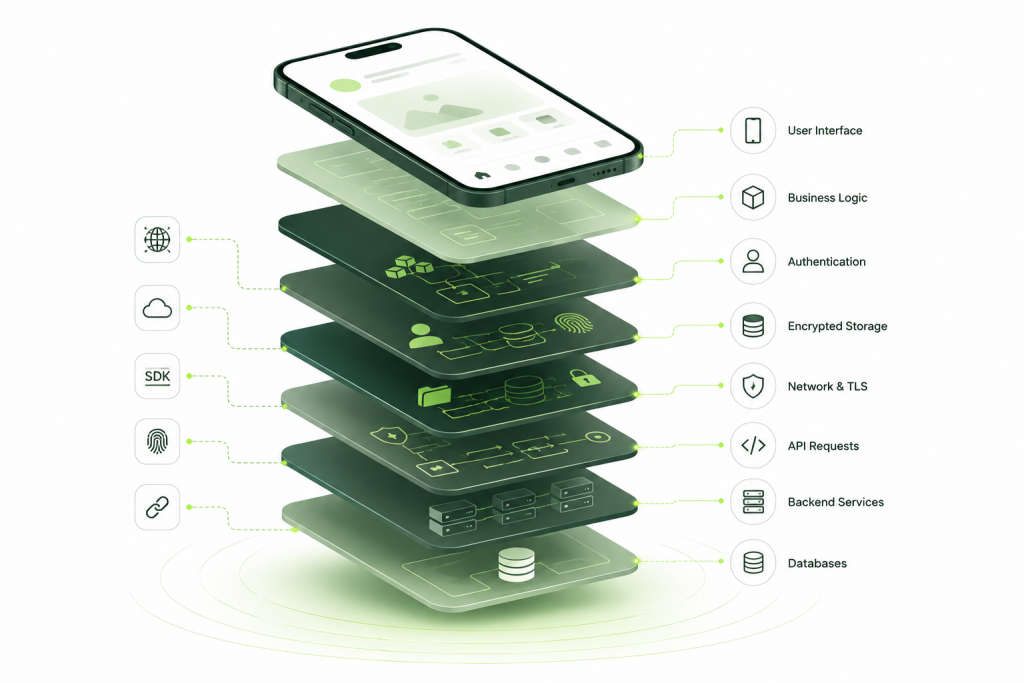
A mobile application can function normally while still exposing sensitive data or privileged actions. Its security depends on more than the software installed on a device. The app may store data locally, exchange information with APIs, and rely on backend systems to enforce authentication and authorisation.
When evaluating the need for a mobile application penetration testing, the central question is how much of this connected environment the assessment will cover. If testing stops at the application package, weaknesses in account boundaries, server side controls, or critical user flows may remain unexamined.
This guide explains how mobile application penetration testing works, what belongs in scope, how findings should be verified, and what your team should prepare before choosing a testing company.
Table of Contents
What is mobile application penetration testing?
Mobile application penetration testing is an authorised security assessment of an iOS or Android application within an agreed scope, whether the build is native or cross platform.
The tester approaches the product from an attacker’s perspective and deliberately manipulates the application, its traffic, and its user flows to determine whether security controls can be bypassed.
The assessment generally combines static and dynamic analysis, with manual validation throughout:
- Static analysis examines the application package, source code when available, libraries, and configuration without running the app. It can reveal exposed secrets, insecure settings, weak use of cryptography, and insecure use of platform APIs or permissions.
- Dynamic analysis observes the application while it runs on a device or emulator. Testers can inspect stored data, intercept network traffic, modify requests, and monitor how the app responds at runtime.
Together, these methods identify potential weaknesses, but the tester must still reproduce each relevant issue and determine what an attacker could achieve.
Automated tools can support this work, but their output requires human review. OWASP notes that mobile security testing tools can produce both false positives and false negatives and do not independently establish an application’s security status.
The role of AI also varies between engagements, so buyers should understand how different AI penetration testing models divide testing, oversight, and validation between the system and the human tester.
This validation gives the buyer evidence of which risks are genuinely exploitable and where remediation should be prioritised. The value of that evidence depends on whether the agreed scope includes the application’s relevant attack paths.
What should a mobile application penetration test cover?
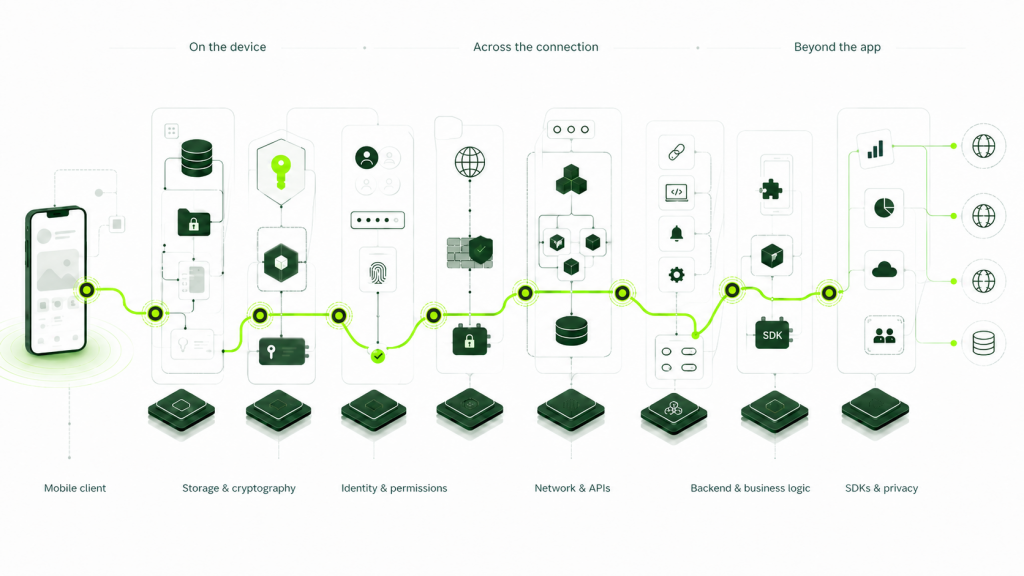
When defining the test scope, you should account for how the application stores and transmits data, authenticates users, enforces permissions, and performs sensitive actions.
The OWASP Mobile Application Security Verification Standard (MASVS) provides a useful baseline. Version 2.1.0 contains 24 controls across eight areas: storage, cryptography, authentication and authorisation, network communication, platform interaction, code quality, resilience, and privacy.
However, the final scope must reflect your product’s architecture, data, and risk, with the relevant controls translated into application specific tests.
The breadth of that scope matters because vulnerability exploitation accounted for 31% of breaches in Verizon’s 2026 reporting dataset, making it the leading initial access route.
Although the figure is not mobile specific, it reinforces the need to examine the application’s connected attack paths rather than treating the package as the complete system.
Before testing begins, confirm whether the scope includes:
Platforms and builds: Identify each iOS and Android build that requires assurance. The platforms can behave differently even when they provide the same user experience. A cross-platform application may also require separate analysis of its JavaScript or Dart layer and the bridges connecting shared code to native platform functions.
Application code, configuration, and local data: This includes the application package, source code when agreed, third-party libraries, configuration, local databases, caches, logs, backups, and sensitive information exposed through screenshots or the clipboard.
Cryptography and network communication: Testers should examine how the application generates, stores, and uses cryptographic keys. They should also test how it establishes secure connections, validates certificates, transmits sensitive data, and responds when traffic is intercepted or modified.
Authentication and session handling: For applications with user accounts, this may include password and passwordless login, multifactor authentication, biometrics, token storage, session expiry, reauthentication, and account recovery.
Authorisation and business logic: The assessment should test whether users can access another account’s information or perform actions assigned to a different role. It should also examine whether transaction values or workflow sequences can be manipulated.
Platform features and integrations: Permissions, deep links, URL schemes, WebViews, inter-process communication, push notifications, camera access, file sharing, and other device capabilities can introduce additional attack paths.
Runtime resilience: Where relevant, testers may attempt to bypass root or jailbreak detection, attach a debugger, hook functions, modify the application, or repackage it.
Privacy and third-party data handling: The scope should state whether the assessment covers consent flows, declared data collection, and information sent to analytics, advertising, or other embedded SDKs.
In Verizon’s broader 2026 breach dataset, third parties were involved in 48% of breaches. For mobile assessments, this reinforces the need to identify which embedded SDKs and external services fall within the agreed scope.
API coverage must be stated explicitly. A mobile test may examine the endpoints and requests exposed through the app while still leaving undocumented endpoints, administrative routes, or other API consumers outside scope.
If the buyer needs assurance over the complete backend API, that requirement should appear in the statement of work.
How does a mobile penetration testing engagement work?
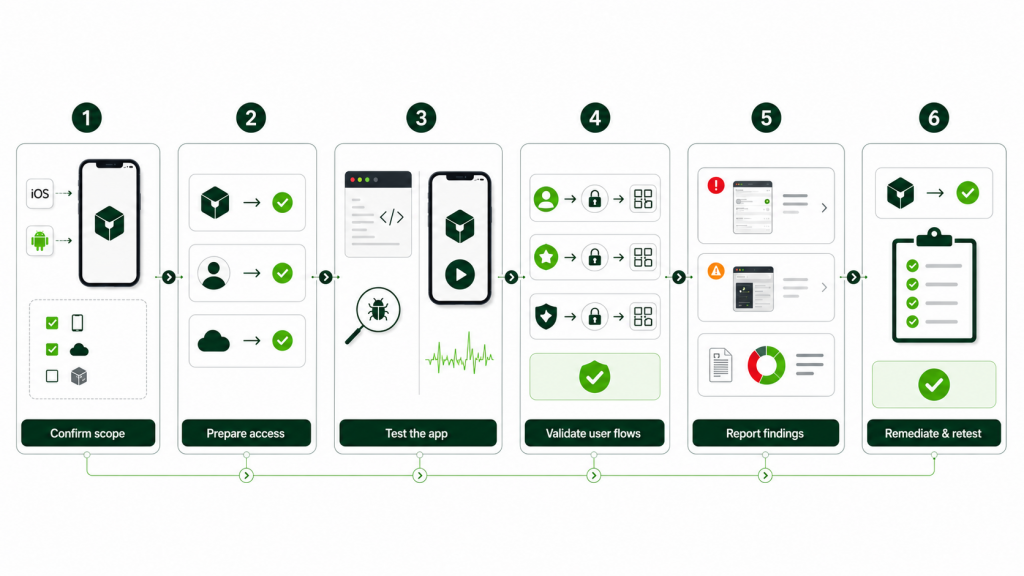
Once the scope is agreed, you should be able to follow how the application is mapped, how weaknesses are tested and validated, and how fixes are verified. These activities typically fall into six stages, although some may overlap.
Confirm the objective and scope. The buyer and testing company document the agreed platforms, builds, user roles, APIs, integrations, test environment, exclusions, evidence requirements, and testing restrictions. Written authorisation must be in place before active testing begins.
Prepare access and map the application. The tester receives the agreed builds, accounts, documentation, and connectivity. Initial mapping identifies application components, data flows, endpoints, platform features, and high-risk user journeys.
Perform static and dynamic testing. The tester reviews the application package and configuration, runs the app on appropriate devices or emulators, intercepts traffic, instruments runtime behaviour, and attempts to bypass relevant protections.
Test authorisation and business flows. Manual testing follows the application’s actual workflows and checks whether account, role, transaction, and process boundaries remain effective when requests and application state are manipulated.
Validate and report findings. Potential issues are reproduced within the agreed testing constraints and linked to their security impact. Validated findings are then prioritised and documented with evidence and remediation guidance.
Support remediation and verify fixes. The testing team answers questions while the engineering team implements remediation. The affected areas are then retested, and the status of each finding is recorded as fixed, open, or accepted as residual risk.
The depth of the engagement depends on the vulnerability classes and attack paths tested within this sequence.
Which vulnerabilities should the assessment test?
Your assessment should cover the following security areas when they are relevant to the application’s architecture and risk. For each suspected weakness, the tester should establish the attack path, whether the relevant control failed, and what an attacker could access, change, or perform.
| Security area | How the attack path is tested | Evidence the buyer should expect |
| Local data and exposed secrets | Inspect the application package, files, databases, logs, backups, caches, and memory for sensitive data, credentials, tokens, or hardcoded keys. Where authorised, test whether exposed material can be reused. | Where the material was found, how it was extracted, the conditions required, and what access or action it enables. |
| Identity, permissions, and workflows | Manipulate login and recovery flows, multifactor authentication, sessions, roles, account references, transaction values, and workflow sequences. Test whether server-side controls enforce identity, permissions, limits, and approvals. | A reproducible authentication bypass, session compromise, cross-account access, privilege escalation, or unintended transaction or workflow outcome. |
| Network communication and cryptography | Intercept and modify traffic, review TLS and certificate validation, and assess how cryptographic keys are generated, stored, and used. Attempt to bypass certificate pinning where it is implemented and included in scope. | Proof that data can be intercepted, decrypted, altered, or forged, together with the affected connection or key and the conditions required. |
| Platform features and integrations | Send manipulated deep links, intents, URL schemes, files, and messages to application components or WebViews. Test whether untrusted input can reach a sensitive function. | The malicious input, the component that accepted it, and the resulting access, script execution, data exposure, or unintended action. |
| Code and third-party components | Review source or decompiled code, build configuration, input handling, dependencies, and native bridges. Determine whether known vulnerable code is present and reachable in the assessed build. | The affected component, version, configuration, or code path, together with proof that the vulnerable behaviour can be triggered. |
| Runtime tampering and resilience | Attach debuggers, hook functions, alter runtime values, modify the application package, and test root or jailbreak protections. Continue testing after a bypass to determine its security impact. | The bypass method, the protection that failed or remained effective, and the security-relevant behaviour enabled by the bypass. |
| Privacy and third-party data handling | Compare permissions, consent flows, and declared data collection with observed runtime behaviour. Inspect network traffic and embedded SDKs for undeclared or excessive collection, tracking, or disclosure. | The data involved, its recipient, and the action that triggered the transfer. The evidence should distinguish exploitable exposure from a privacy or compliance gap. |
CredShields publishes sanitised mobile findings that illustrate this level of validation. They include an admin tier API key recovered from an APK and a certificate-pinning bypass that enabled traffic interception on a rooted device.
Other examples describe insecure deep-link handling that allowed JavaScript execution in a WebView and overly broad Keychain accessibility that exposed keys through a backup.
These examples show the level of proof a buyer should expect before a weakness is treated as a validated finding.
What should the report and retest enable your team to do?
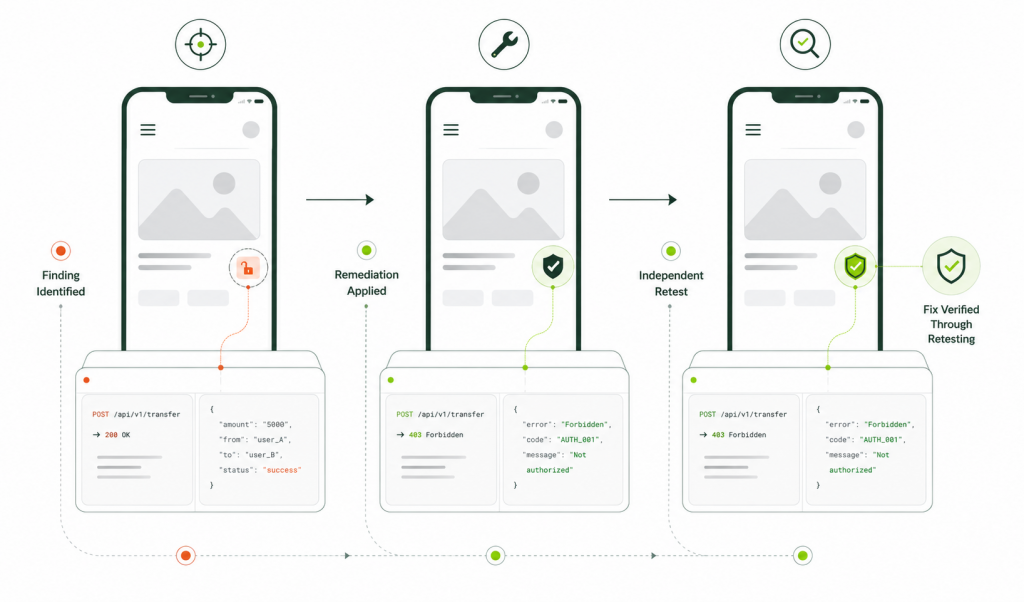
The report should turn validated findings into usable evidence for leadership, engineering teams, and external reviewers. It should explain the exposure, provide enough detail to reproduce and remediate each issue, and show what was assessed.
The retest should then confirm which risks were resolved and which remain open or have been accepted as residual risk.
At minimum, expect:
- An executive summary with the scope, engagement dates, overall risk, and severity distribution.
- A clear list of the applications, builds, platforms, environments, roles, and endpoints assessed.
- The methodology, framework version, assumptions, and exclusions.
- A separate entry for each finding with affected components, reproduction steps, evidence, impact, severity, and remediation guidance.
- Mobile-specific evidence such as intercepted traffic, runtime-instrumentation steps, relevant commands or scripts, and modified application artefacts where needed for reproduction.
- A retest record that identifies the build and date tested, includes verification evidence, and marks each finding as fixed, open, or accepted as residual risk.
That verification matters because Verizon’s 2026 DBIR found that only 26% of CISA Known Exploited Vulnerabilities were fully remediated during 2025. The median time to full resolution increased from 32 to 43 days. Although the data is not mobile-specific, it illustrates why a finding should not be treated as closed until the fix has been verified.
Request a CredShields sample pentest report
These deliverables and retest terms should be agreed before the engagement timeline is finalised.
How long does a mobile application penetration test take?
CredShields publishes the following planning ranges for a mobile application penetration test:
- Typical application: Within one week or two per platform (depends on the scope).
- Larger or more complex application: Three to four weeks when the scope includes complex SDK integrations, biometrics, or extensive offline functionality.
- Cross-platform application: We estimate that testing takes approximately 30% longer than a single-platform assessment because both the cross-platform layer and native bridges require testing.
The total calendar duration should still be stated in the proposal. When both iOS and Android are in scope, confirm whether testing will run in parallel and whether the stated timeframe includes reporting.
Preparation, active testing, reporting, remediation, and retesting should appear as separate milestones.
Delayed builds, incomplete accounts, blocked access, or unclear scope can reduce the effective testing window. Retesting can begin only after the relevant fixes are available, so preparation must be complete before active testing starts.
How should you prepare for a mobile application penetration test?
Testing can proceed as scoped only when the tester can install the agreed builds, reach the test environment, use every relevant role, and exercise the workflows included in scope.
| The preparation checklist should cover the following: The correct builds: Supply the agreed application package for every platform in scope, such as an Android APK or iOS IPA, together with an approved installation route. If only an Android App Bundle is available, agree how the tester will obtain installable APKs. Identify the version, build configuration, and release status. Provide source code when the agreed testing model includes it. Architecture and API information: Share relevant data flows, API documentation, backend hosts, third-party services, deep-link schemes, and any mobile-specific trust boundaries. A representative test environment: Confirm whether testing will use staging or production, which data may be changed, and which actions are prohibited. Arrange VPN access, IP allowlisting, or mobile device management requirements in advance. Accounts for every relevant role: Include administrators, standard users, privileged operators, and any other role involved in sensitive workflows. When the scope includes horizontal authorisation or cross-account testing, provide at least two test accounts for each relevant role. Populate the accounts with the records, transactions, or other objects needed to exercise the workflows in scope. A single standard-user account cannot show whether one user can access another user’s information or actions. Access to security controls: Explain how to complete multifactor authentication, biometric enrolment, account recovery, device registration, and any test-specific verification step. High-risk workflows: Identify payments, transfers, approvals, document access, health or identity data, offline operations, and other actions where misuse would create material impact. Testing constraints and contacts: Document rate limits, restricted actions, incident contacts, notification procedures, and the route for resolving access problems during the engagement. Reporting requirements: State whether the report must support a customer review, app-store submission, internal risk decision, or compliance assessment. Confirm any required control mapping before testing begins. If the report will support a SOC 2 audit, first clarify how penetration testing supports the required control evidence. |
Before the testing window opens, confirm that the testing team can access every agreed build, account, environment, and supporting document.
Any remaining gap that limits coverage should be documented as a scope limitation.
How do you choose a mobile application penetration testing provider?

Use the following questions to compare mobile application penetration testing companies and determine whether the proposed engagement will cover the right risks and produce evidence your team can use.
| Scope and methodology Which iOS, Android, and cross-platform layers are included? Does the scope cover only the API requests visible through the app, or the complete backend API?Which OWASP MASVS version and applicable control groups will define coverage, and how will the MASTG guide testing? How will the testing team assess product-specific authorisation and business logic? Which tests require physical devices, and which will use emulators or simulators? Testing accountability and information handling Will a named mobile security researcher be responsible for manually validating every reported finding? How will application builds, source code, credentials, test data, and report evidence be transferred, stored, retained, and deleted? Evidence quality What technical evidence and reproduction material will accompany each finding? Can the company provide a relevant report sample, sanitised mobile findings, or attributable customer evidence? Post-report support Are remediation support and retesting included? How will fixed, unresolved, and accepted findings be documented after the retest? |
Before proceeding, require the written proposal to identify the builds, platforms, roles, API boundary, testing techniques, deliverables, timeline, information-handling terms, and retest conditions.
This creates a consistent basis for comparing proposals and later confirming whether the final report covers the agreed risks.
Talk to a CredShields engineer about your mobile application scope
Frequently Asked Questions about Mobile Application Penetration Testing
- Do you need to provide source code for a mobile application penetration test?
Source code is not required for every engagement. A black-box assessment can examine the distributed application package and its observable runtime behaviour without access to the original code.
Providing source code allows the tester to inspect implementation details and developer artefacts that may be difficult to assess reliably from the compiled package alone. The written scope should state whether source code is included and which additional review it enables.
- Can a mobile application penetration test be performed in production?
It can, but production testing requires explicit authorisation and tighter controls. A representative staging environment is generally safer for techniques that could change data, trigger live transactions, affect customer accounts, or disrupt availability.
If production access is necessary to examine live configurations or integrations, define the approved techniques, test data, rate limits, testing windows, monitoring arrangements, and emergency contacts before testing begins. Every prohibited action should also be recorded in the rules of engagement.
- Do mobile pentesters use real devices or emulators?
Both may be needed during an engagement. Emulators and simulators support rapid iteration, instrumentation, and testing across different operating-system versions.
Physical devices are needed when testing depends on device hardware or a realistic runtime environment, including hardware-backed key storage, biometrics, and trusted execution environment behaviour.
CredShields states that it uses both and performs final verification on physical devices.
- How often should you run a mobile application penetration test?
Testing frequency should reflect the application’s risk, rate of change, customer commitments, and compliance obligations. Conduct the first assessment before launch or before a customer or compliance decision depends on security evidence.
Repeat testing after material changes to authentication, authorisation, payments, sensitive data flows, backend APIs, third-party SDKs, or platform integrations.
A security incident that reveals a new attack path should also trigger reassessment. Periodic testing can identify weaknesses introduced by changes to dependencies, operating systems, and supporting infrastructure.