

Why Isn’t Rate Limiting Enough to Stop Bot Attacks? A Complete Guide for E-Commerce and API Teams
Rate limiting caps how many requests a single IP address or account can send in a set window. Automated Cyber Monday attacks are built to stay under that cap. They spread requests across residential proxies and stolen accounts, pack many attempts into one API call, or send requests at the same instant. Rate limiting still helps, but your sensitive flows need their own controls and testing.
Picture a login API that allows five attempts per minute from each IP address. Over one weekend, a credential stuffing run tries 200,000 stolen passwords, two per account, from 40,000 residential addresses. No address ever reaches its limit, the dashboard stays green, and some of those logins succeed.
Cyber Monday falls on 30 November this year, and the bots start well before it. F5 Labs found that automation rose to 28.6% of retail transactions in the 2025 season, up from 18.5% the year before. This guide uses Cyber Monday as its running example, and the same gaps open up on any day with a launch, a sale, or a limited drop. It is written for the engineering, AppSec, and fraud teams who own login, checkout, and API traffic. It covers where rate limiting breaks, how attackers get past it, what those gaps have cost real companies, and how to close and test them before your next peak.
Table of Contents
What Rate Limiting Does and What It Was Built For
Rate limiting is a control that caps how many requests a client can make to an application within a fixed time window. When a client goes over the cap, the server slows it down, rejects the request with an HTTP 429 error, or blocks it for a while.
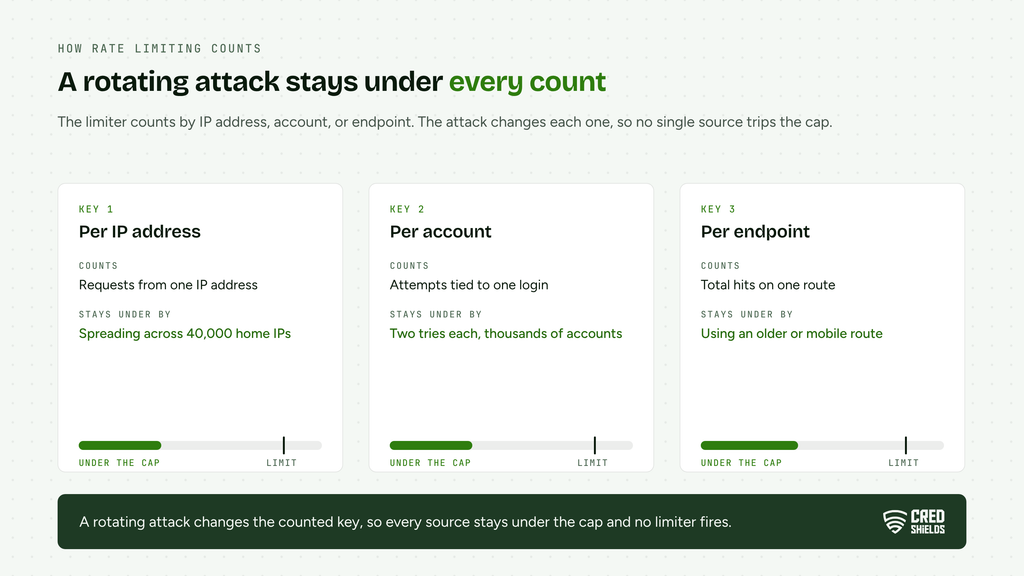
Most teams key their limits to one of a few things. The key decides what the limiter counts, so it also decides what an attacker has to change to stay under it.
- Per IP address: Counts requests from one network address. It is cheap to run, and easy to beat by spreading traffic across many addresses.
- Per account or session: Counts actions tied to one login or session token. It works well inside logged-in flows and sees nothing when an attack rotates accounts.
- Per endpoint: Caps total traffic to one route, such as the login API. It protects capacity, and it slows real customers along with the bots.
Rate limiting was designed to keep services available. The OWASP API Security Top 10 files missing limits under API4:2023 Unrestricted Resource Consumption, a risk about servers running out of capacity. Business abuse has its own entry, API6:2023 Unrestricted Access to Sensitive Business Flows. It covers legitimate features, such as buying an item or claiming an offer, automated at a scale that hurts the business.
That split leaves a gap. A limiter that keeps your login API online can still let thousands of credential stuffing attempts through, as long as each source stays under its cap.
Recommended read: If you or your team are planning to review promotion and checkout logic before the sale, this article on business logic vulnerabilities and AI agents is a great place to start.
How Rate Limiters Count Requests and Where the Counting Breaks
Before looking at outside attacks, check the limiter itself. Most rate limiting runs on one of three counting methods, and each one has a known weak spot.
- Fixed window: Counts requests in set blocks of time, such as each calendar minute. A client can send its full allowance at 10:00:59 and again at 10:01:00, which doubles the limit inside two seconds.
- Sliding window: Counts requests over the last 60 seconds at any moment. It closes the boundary gap, and it costs more memory to track.
- Token bucket: Gives each client a bucket of tokens that refills at a steady rate, and each request spends one. Stripe uses this algorithm for its main request limiter. It allows short bursts by design, so the bucket size decides how large a burst can get.
Two more gaps come from how the counter is deployed:
- Counters kept on each server: When every server keeps its own count, a limit of 10 per minute behind a load balancer with 8 servers can let through up to 80.
- Counters that read and write in separate steps: Two requests can read the same count before either one writes the new value back. Stripe’s example code relies on Redis scripts running atomically, so nothing can run between reading the count and writing it.
These gaps let more traffic through than your configuration says, before an attacker has changed anything at all.
Where to Enforce Rate Limiting: Edge, Gateway, Application, or Database
Where a limit runs decides what it can count. Each layer sees a different part of the request, so sensitive flows usually need limits in more than one place.
- Edge or CDN: Sees IP addresses, headers, and request rates before traffic reaches your servers. It absorbs floods cheaply, and it can’t see which account or card number an attempt targets.
- API gateway: Sees routes, API keys, and client IDs. It is the natural place for one shared set of rules across web, mobile, and partner APIs.
- Application: Sees the username, the gift card number, and the coupon code. Limits keyed to the target of each attempt have to live here.
- Database: The only layer where a single-use rule holds when many requests arrive at the same instant.
Stripe splits the job in a similar way. It runs four types of limiters in production: a request rate limiter, a concurrent requests limiter, and two load shedders that keep capacity for critical requests when its systems are under strain.
What a Good Rate Limit Response Looks Like
When a limit triggers, the response decides what happens next. Real customers need to know how long to wait, and attackers should learn as little as possible about where your limits sit.
The standard response is HTTP 429 Too Many Requests, defined in RFC 6585. It can carry a Retry-After header that tells the client how long to wait before trying again. Stripe’s engineering team advises teams to choose between 429 and 503 deliberately, and to make every rejection clear enough for the client to act on.
An IETF working group is also standardizing RateLimit header fields for HTTP. The draft defines RateLimit-Policy and RateLimit headers that tell clients their quota and how much of it remains, so well-behaved clients can slow down before they get blocked. The same draft notes that these headers are not meant for authorization or other access controls.
That difference points to a simple rule for API rate limiting:
- Partner and public APIs: Publish your limits and return RateLimit headers, so integrations can pace themselves.
- Login, gift card, coupon, and password reset routes: Return a plain 429 or a challenge, with no exact thresholds. A header that shows the attempts remaining tells a bot exactly how fast it can go and still stay under the limit.
How Much Automated Traffic Hits Retailers Before Cyber Monday
Automated traffic on retail sites has grown faster than most rate limiting rules have been retuned. The figures below come from vendors that see this traffic on their customers’ sites, so read them as what those retailers saw and as a guide to direction.
F5 Labs studied three Black Friday seasons across retailers using its bot defense. Automation rose from 17.4% of transactions in 2023 to 18.5% in 2024 and 28.6% in 2025. The flows it measured include product search, login, account creation, password reset, adding to cart, and gift card balance checks.
Gift card balance checks show the shift most clearly. On the e-commerce sites F5 Labs protects, 11.4% of balance checks were automated in 2025, up from 0.6% in 2024. The peak also came early: the busiest day for automation in 2025 was 21 October, 38 days before Black Friday.
The peak moves from year to year. In F5’s breakdown, the busiest day for automation came 23 days before Black Friday in 2023, one day after it in 2024, and 38 days before it in 2025.
Other vendors report the same pattern from different angles:
- Kasada: In its 2025 holiday review, retail bot activity peaked in the week before Black Friday. Kasada data cited by American Banker puts holiday-month login traffic from bots at 2.5 to 3 times the level of the rest of the year.
- Imperva: Its 2026 Bad Bot Report found bots made up 53% of web traffic in 2025. During Black Friday 2025, bot attacks on retail sites ran 50% above the November average.
- Radware: Its 2026 E-Commerce Bot Threat Report found bad bots made up 43% of e-commerce traffic in the 2025 holiday season, up from 31% a year earlier, while human shoppers made up 46%. At one large multinational retailer, fake account registrations grew sixfold and carding attacks rose about 15 times.
For rate limiting, timing matters as much as volume. Limits tuned for one busy weekend can miss automation that has been running at a steady rate since October.
Recommended read: If you or your team are planning capacity and security for a high-traffic launch, this article on what the GTA 6 launch architecture teaches about high-stakes releases is a great place to start.
Five Ways Attackers Get Around Rate Limiting
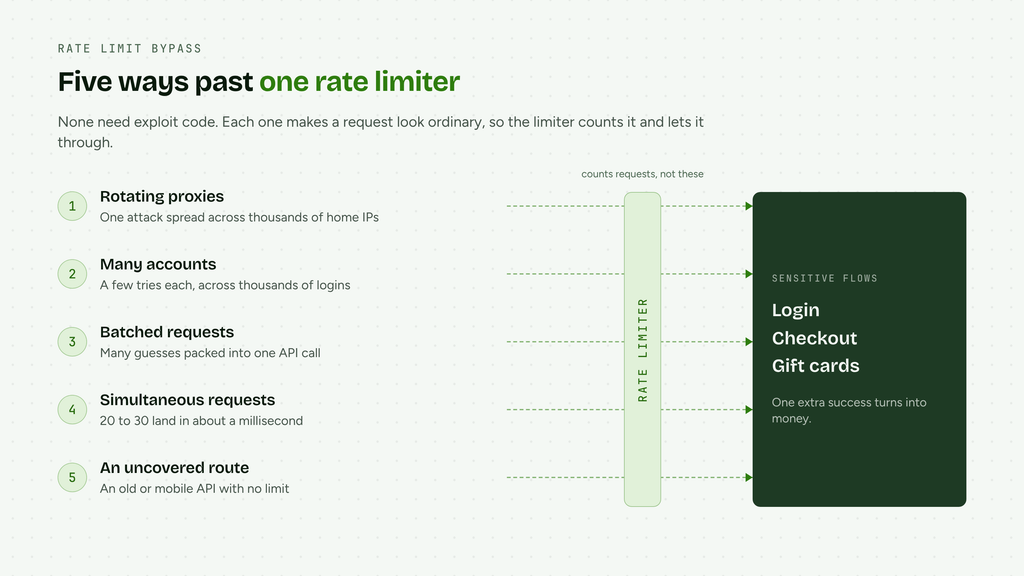
Most rate limit bypass methods need no exploit code. They change the thing your limiter counts, so each request looks ordinary on its own and the total still adds up to an attack.
Rotating Residential Proxies Spread One Attack Across Thousands of IPs
A per-IP limit assumes one attacker sits behind one address. Residential proxy networks route traffic through real home internet connections, so each address only sends a handful of requests. Imperva’s 2025 Bad Bot Report found that 21% of bot attacks using ISP addresses ran through residential proxies. F5 Labs describes residential proxies as a must-have for bot operators.
Blocking those addresses also blocks the real shoppers who share them. That is why IP-based rate limiting can’t carry the defense alone.
Spreading Attempts Across Many Accounts and Sessions
Per-account limits stop someone hammering a single login. Credential stuffing works the other way: one or two attempts per account, across thousands of accounts from a breached list. Verizon’s DBIR research found credential stuffing made up a median 19% of daily authentication attempts in SSO provider logs. In retail, F5 Labs found that 25.7% of web login attempts were attempted account takeovers.
A slow, spread-out campaign can run for weeks before anyone connects the dots. Chick-fil-A disclosed a credential stuffing attack that ran for about two months and reached 71,473 loyalty accounts. Roku found about 576,000 accounts accessed the same way in 2024, and attackers used stored payment details to make purchases from fewer than 400 of them.
Stored balances and saved cards make loyalty accounts worth taking over. That is why rewards and gift card flows draw the same bots as login.
Fake account creation follows the same pattern. Each new account stays well inside its limits while it claims one new-customer offer.
Packing Many Attempts Into One Request
Some APIs let one HTTP request carry many operations. GraphQL aliases are the best-known case: PortSwigger’s Web Security Academy shows how one request can check many discount codes or passwords while the limiter counts a single call. REST batch endpoints can behave the same way. A limit of 10 requests a minute offers little protection when each request carries 100 guesses.
Sending Requests at the Same Moment
Rate limiting counts requests over time, so requests that arrive together can all pass before any counter updates. The same gap breaks single-use logic, such as a coupon that is checked first and marked as used afterwards. PortSwigger’s single-packet attack research shows 20 to 30 requests landing within about a millisecond.
HackerOne has published a case where a bug bounty hunter sent 30 parallel requests to accept a $20,000 Stripe fee discount. Every request succeeded, which added up to $600,000 of fee-free transactions. Stripe’s first fix still left a race condition, and the hunter received a $5,000 bounty. A per-minute limit never sees a burst like this, because it is over in about a millisecond.
Finding the Endpoint the Limit Doesn’t Cover
Limits are often set per route, so attackers look for another route to the same function. These are the gaps that turn up most often:
- Older API versions: A /v1/login route stays live after /v2/login gets limits. OWASP lists forgotten versions under API9:2023 Improper Inventory Management.
- Mobile and partner APIs: Separate routes reach the same login or gift card service, sometimes under different rules.
- Trusted headers: Some limiters read the client IP from a header such as X-Forwarded-For. A PortSwigger lab shows how spoofing that header gets around an IP-based block.
- Path variations: A trailing slash or a change in letter case can make the limiter treat the same route as a new one.
An API can also hand back far more than each request suggests. In Singapore, the PDPC’s decision on Carousell describes an API that listed the users an account followed, or was followed by, and also returned their non-public personal data because a filter had been left off. By scraping the lists of 46 accounts with very large followings in May and June 2022, an attacker gathered data that was later offered for sale covering at least 2.6 million users. The PDPC fined Carousell S$58,000 across this and a separate incident, and directed it to review its software testing procedures.
Rate limiting counts requests, so it can’t tell you how much data each response carries. Check what every route returns as well as how often it can be called.
Recommended read: If you or your team are planning to rely on scanners for this, this article on why SAST and DAST alone fall short is a great place to start.
What Rate Limiting Gaps Have Cost Real Companies
The cases below are all public, and between them they cover most of the bypass methods in this guide. Most ran for weeks or months before anyone acted, so detection time deserves as much attention as the limits themselves.
| Company and year | What happened | The gap | Outcome |
|---|---|---|---|
| Chick-fil-A, 2022 to 2023 | Automated credential stuffing against the website and mobile app for about two months | Attempts spread across many accounts | 71,473 loyalty accounts accessed; loaded funds frozen and stored payment methods removed |
| Roku, 2024 | Credential stuffing with passwords stolen from other breaches | Reused passwords accepted at scale | About 576,000 accounts accessed; fewer than 400 used for purchases with stored payment data, and customers refunded |
| 23andMe, 2023 | Credential stuffing from April to September 2023 | About 14,000 accessed accounts opened linked profiles through a relatives feature | Data on about 6.9 million people downloaded; UK ICO fine of £2.31 million |
| Carousell, 2022 | Scraping through an API that returned non-public data | Each response carried more data than the feature needed | Data on at least 2.6 million users offered for sale; PDPC fine of S$58,000 across two incidents |
| Stripe, reported through HackerOne | 30 parallel requests to accept a one-time fee discount | Check-then-update logic open to a race condition | $600,000 of fee-free transactions; first fix still raced; $5,000 bounty |
Detection lag is the common thread. At 23andMe, the ICO found that credential stuffing began in April 2023, and a full investigation started only in October, after an employee found the stolen data advertised for sale online. A rate limiter that never fires raises no alert, so site-wide monitoring has to cover what per-source limits miss.
Which Cyber Monday Flows Need More Than a Request Cap
The flows attackers return to are the ones where one extra success turns into money. F5 Labs advises retailers to protect the business processes attackers keep targeting, from account access and promotions to gift cards and checkout. The table below sets out what automation does to each flow and what to add on top of rate limiting.
| Flow | What automation does | What to add beyond rate limiting |
|---|---|---|
| Login | Credential stuffing across many accounts | Limits keyed to the username and device as well as the IP; MFA on risky logins; breached-password checks |
| Account creation | Fake accounts that each claim a new-customer offer | Limits per payment method and phone number; verification before the offer applies |
| Password reset | Account enumeration and reset spam | The same response for known and unknown emails; limits per target account |
| Gift card balance check | Testing card numbers in bulk | A required PIN; limits per card number; alerts on bursts of failed lookups |
| Promo and coupon codes | Code guessing and repeat redemption | Redemption that happens in one atomic step; limits per code and per account |
| Add to cart and checkout | Inventory hoarding and bot checkouts | Hold limits per account; purchase limits per item; checks at payment |
Each control in the right column counts something an attacker can’t swap cheaply, such as the card number or the payment method. Rate limiting by IP address still earns its place. It just can’t do this job by itself.
If your team logs threats by name, the OWASP Automated Threats to Web Applications project gives each of these flows an identifier. OAT-008 Credential Stuffing covers login, OAT-019 Account Creation covers fake sign-ups, OAT-002 Token Cracking covers guessing coupon and voucher codes, and OAT-021 Denial of Inventory covers holding stock without buying it. Using the same names in test plans and alerts makes it easier to see which flows have been checked.
Recommended read: If you or your team are planning to test account and order flows, this article on how one logged-in user can reach everyone’s data is a great place to start.
How to Make Rate Limiting Harder to Bypass
Closing a rate limit bypass usually means changing what the limiter counts and where it runs. These changes address the gaps described above, starting with the ones that cost the least to make.
- Count what attackers can’t rotate cheaply: Add limits keyed to the username, card number, coupon code, and device, alongside the IP address. An attacker can rent residential IPs in bulk, while valid card numbers and codes are scarce.
- Enforce limits in one shared layer: Put the rules at the API gateway or edge, so web, mobile, partner, and older API versions all pass through them. Keep an inventory of every live version, as OWASP API9 recommends.
- Use one shared, atomic counter: Keep counts in a central store and update them in a single atomic step, so extra servers and simultaneous requests can’t slip past.
- Count operations as well as requests: Cap aliases and batched operations in GraphQL, and limit the size of batch requests in REST APIs.
- Trust forwarded IP headers only from your own proxies: Read X-Forwarded-For only when it comes from infrastructure you control.
- Slow down or challenge before you block: Real shoppers on a shared network can pass a challenge, while a script running thousands of attempts usually stalls on it.
- Watch the site-wide totals: Track failed logins and failed gift card lookups across the whole site as well as per client. A low and slow campaign shows up as a rising site-wide failure rate long before any single source trips a limit.
For single-use actions, put the fix in the database. Make the check and the update one step, so only one request can ever succeed:
UPDATE coupons
SET redeemed_by = :user_id, redeemed_at = NOW()
WHERE code = :code
  AND redeemed_by IS NULL;
-- Apply the discount only if this statement updated exactly one row.
If 30 requests arrive together, the database lets exactly one of them change the row. The other 29 update nothing, and your code can refuse them cleanly.
Recommended read: If you or your team are planning for bots that use AI to adapt mid-attack, this article on adversarial AI is a great place to start.
Account Lockout vs Throttling
Locking an account after a few failed logins looks like the strictest option. On customer accounts, it also gives attackers a way to lock real shoppers out during a sale, simply by sending wrong passwords for their usernames.
Current guidance prefers throttling first. NIST SP 800-63B-4 requires verifiers to rate limit failed authentication attempts and caps consecutive failures on one account at 100. To avoid locking out the real account owner, it allows a bot challenge before each attempt, a wait that grows as the account nears its limit, and risk-based checks on signals such as IP address, location, and request timing.
PCI DSS v4.0.1 requirement 8.3.4 sets a stricter rule for user accounts on systems in scope for card data: lock the user ID after no more than 10 invalid attempts, for at least 30 minutes or until the user’s identity is confirmed. That fits staff and admin logins. For customer logins, progressive delays and challenges usually protect accounts without handing attackers a lockout switch.
How to Set Rate Limits From Your Own Traffic
Limits copied from a vendor default or another company’s settings rarely fit your flows. The numbers should come from how your own customers behave, one flow at a time.
Work through these steps for each sensitive flow:
- Baseline each flow from a quiet week: For login, gift card balance checks, coupon redemption, and account creation, record how many attempts a typical customer makes per hour and per day, and how many your busiest real customers make.
- Set the limit just above real behavior: If real customers rarely check more than a few gift cards an hour, a limit of 100 an hour gives bots plenty of room.
- Plan separate sale-period limits: Traffic per customer rises during a sale. Agree the higher limits in advance, and keep the limits on targets such as card numbers and coupon codes unchanged.
- Dark launch before you enforce: Stripe runs each new limiter in observation mode first to see what traffic it would block, then tunes thresholds so real usage isn’t disrupted.
- Add a kill switch and alerts: Stripe also puts limiters behind feature flags so a misfiring rule can be turned off quickly, and it tracks how often each limiter fires.
- Decide how each limiter fails: Stripe’s limiters fail open, so a Redis outage doesn’t break requests. For gift card and coupon flows, decide in advance whether an outage should let requests through or pause the flow.
Write the final numbers and the reasons behind them into your runbook. During a sale, the team on call can then adjust a limit knowing what it was meant to protect.
How to Test Rate Limiting Before Cyber Monday
A limit that holds up in a load test can still fail against a script built to avoid it. Testing has to copy the attacker’s methods on each sensitive flow. Tests run against staging and need no production deploy, so they can go ahead during a code freeze.
- Map every route to each sensitive function: List the web, mobile, partner, and older API routes that reach login, gift card balance checks, and coupon redemption.
- Rotate the key: Send attempts across many IP addresses and accounts, and record which limits still trigger.
- Batch the calls: Put many operations into one GraphQL or batch request, then count how many the server processes.
- Race the single-use actions: Send 20 to 30 identical requests at once to coupon and gift card redemption, and confirm exactly one succeeds.
- Spoof the headers: Add X-Forwarded-For and similar headers, and check whether the limiter treats you as a new client.
- Check the alerts: Confirm that blocked and failed attempts reach someone who will act on them during the sale.
Record the result for every route, including the ones that pass. A clean result on /v2 says nothing about /v1 or the mobile API.
Retest every fix the same way. In the Stripe case above, the first fix added a check and the race condition was still there. Sending the same parallel burst again is how you confirm a fix holds.
For a shared reference in test plans, the OWASP Web Security Testing Guide covers this under WSTG-BUSL-05, Test Number of Times a Function Can Be Used Limits. It checks whether a user can run a limited function, such as applying a discount, more times than the business allows. Citing the test ID in your plan and report shows engineers and auditors exactly what was covered.
Recommended read: If you or your team are planning security testing with a small AppSec team, this article on how application security risk changes with company size is a great place to start.
What to Watch During the Sale
Rate limiting catches fast attacks. Slow ones show up in the totals, so someone needs to watch site-wide signals throughout the sale and act on them.
Track these signals for each flow, against the baseline from your quiet week:
| Signal | What it can mean | First response |
|---|---|---|
| Login success rate falls while login attempts rise | Credential stuffing with a stolen password list | Add a challenge on risky logins and look for a shared pattern behind the failures |
| Failed gift card balance lookups climb | Bots testing card numbers | Require the PIN on every lookup and lower the per-card limit |
| New accounts per payment method or phone number rise | Fake accounts claiming new-customer offers | Hold the offer until verification and cap accounts per payment method |
| 429 responses jump on one route | An attack, or a limit set too low for real shoppers | Check whether the blocked traffic looks like customers before you loosen or tighten the limit |
| One coupon code is redeemed more often than planned | Repeat redemption or a leaked code | Disable the code and check its redemptions for parallel requests |
Agree before the sale who can tighten a limit or switch on a challenge, and which emergency rules are approved in advance. Put those rules in the on-call runbook, so the person watching the dashboards can act without waiting for approval.
What Standards and Regulators Expect From Rate Limiting
Rate limiting rarely appears in regulations by name. The expectation shows up instead in authentication standards, API security guidance, and regulators’ decisions after a breach.
| Standard or regulator | What it expects | Who it applies to |
|---|---|---|
| NIST SP 800-63B-4 | Rate limiting on failed authentication attempts, with no more than 100 consecutive failures per account | US federal systems, and widely used as a reference by private companies |
| PCI DSS v4.0.1, requirement 8.3.4 | Lockout after no more than 10 invalid attempts, for at least 30 minutes | User accounts on systems in scope for card data |
| OWASP API Security Top 10 | API4 covers missing limits on resources, and API6 covers automated abuse of sensitive business flows | Any team building or testing APIs |
| Singapore PDPC | Reasonable security arrangements for personal data, enforced against Carousell after API scraping | Organizations handling personal data in Singapore |
| MAS TRM Guidelines | Penetration testing of internet-facing systems at least once a year and after major changes | Financial institutions regulated by MAS |
| UK ICO | Appropriate security measures, enforced with a £2.31 million fine on 23andMe after credential stuffing | Organizations handling UK residents’ personal data |
None of these replace testing your own flows. They do give you a shared reference when you explain to leadership or an auditor why a limit sits where it does.
Recommended read: If you or your team are preparing for a SOC 2 audit, this article on what to expect from SOC 2 penetration testing is a great place to start.
Rate Limiting Readiness Checklist for Cyber Monday
Run through this list for each sensitive flow before 30 November. You can check every item on staging, without touching production.
- Every route to login, account creation, password reset, gift card balance checks, and coupon redemption has a limit, including mobile and older API versions.
- Limits count the target of each attempt, such as the username or card number, as well as the IP address.
- Counters are shared across servers and update in one atomic step.
- The limiter ignores client-supplied headers such as X-Forwarded-For unless your own proxy set them.
- GraphQL and batch endpoints cap the number of operations per request.
- Each API returns only the fields its screen needs, with no hidden personal data.
- Single-use coupons and gift cards survive 30 parallel redemption requests with exactly one success.
- Gift card balance checks require the PIN as well as the card number.
- Login, gift card, coupon, and password reset responses don’t reveal exact thresholds or attempts remaining.
- Each limiter ran in observation mode before enforcement and has a kill switch.
- Blocked and failed attempts raise alerts that reach someone during the sale.
- You have a traffic baseline from a quiet week to compare Cyber Monday against.
Frequently Asked Questions (FAQs) About Rate Limiting and Bot Attacks
These are the questions teams ask most often when they review rate limiting before a big sale. Each answer stands on its own.
Q1. What is rate limiting?
Rate limiting caps the number of requests a client can send to an application within a set time window, usually keyed to an IP address or account. Requests over the cap are slowed, rejected with an HTTP 429 error, or blocked for a period.
Q2. Can attackers bypass rate limiting?
Yes. Common rate limit bypass methods include rotating residential proxies, spreading attempts across many accounts, batching operations into one request, sending requests at the same moment, and using routes the limit doesn’t cover.
Q3. Is rate limiting enough to stop credential stuffing?
Rarely, on its own. Credential stuffing sends a few attempts per account from many addresses, so per-IP and per-account limits each see normal traffic. Pair rate limiting with MFA on risky logins and with limits keyed to usernames and devices.
Q4. What is the difference between rate limiting and bot management?
Rate limiting counts requests. Bot management looks at who is sending them, using signals such as device fingerprints and behavior. Most retail sites need both, plus controls inside each sensitive business flow.
Q5. How do you test rate limiting before a sale?
Copy what attackers do, on staging. Rotate IP addresses and accounts, batch operations, send parallel requests to single-use actions, and check every API version. Then confirm that blocked attempts raise alerts someone will see.
Q6. Does Singapore law require rate limiting?
Singapore law doesn’t name rate limiting as a requirement. The PDPA’s Protection Obligation does require organizations to make reasonable security arrangements for the personal data they hold. The PDPC has enforced it against API weaknesses, including a S$58,000 fine on Carousell after an API exposed non-public user data to scraping.
Q7. How often should rate limiting be tested?
Test before every major sale and after any change to login, checkout, or API routing. For financial institutions, the MAS Technology Risk Management Guidelines expect penetration testing of internet-facing systems at least once a year and whenever those systems undergo major changes.
Q8. Can rate limiting block real customers on Cyber Monday?
Yes, when limits are keyed only to IP addresses. Many shoppers share one address on mobile networks and office Wi-Fi, so a strict per-IP cap can lock out a whole group at once. Keying limits to the target of each attempt, and challenging before blocking, keeps real shoppers moving.
Q9. Is account lockout the same as rate limiting?
No. Rate limiting slows or blocks a client once it goes over a set rate, while account lockout disables one account after a number of failed logins. On customer accounts, lockout can let attackers lock real shoppers out, so most teams pair rate limiting with challenges and progressive delays instead.
Start With One Flow This Week
Pick the flow where one extra success costs you the most, usually gift card balance checks or coupon redemption. Run the parallel and rotation tests above on staging and see whether anything gets past your rate limiting.
CredShields penetration testing covers these abuse paths across your web and API surfaces. Every finding comes with a reproduced, replayable attack path your engineers can check for themselves, and each fix is retested before the finding is closed. See how CredShields penetration testing works and get your checkout flows tested before the next sale.